How to Stay Informed Without Doomscrolling
To stay informed without doomscrolling, get the news from a few reliable newsrooms at set times, in a format that ends, and keep it apart from social media feeds. Turn off most alerts, read or watch the report before any commentary, and stop once you know what happened. Feeds built to keep you scrolling are the problem, not the news itself.
On this page
Why Doomscrolling Is Hard to Stop
Doomscrolling is scrolling through bad news for long stretches and finding it hard to put the phone down. It is not a lack of willpower. Social feeds are designed to keep you watching, and alarming stories get the most attention, so the feed keeps serving more of them.
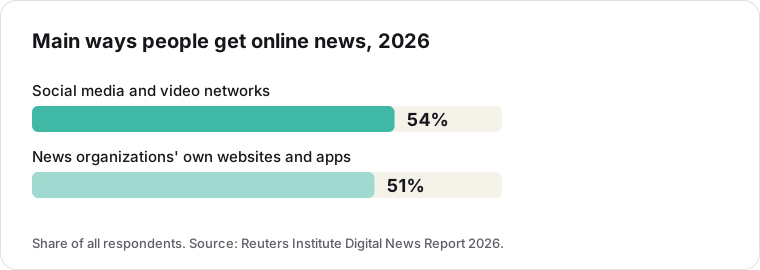
It is also where much of the news now lives. In the Reuters Institute’s 2026 Digital News Report, social media and video networks were the most widely used way of getting online news for the first time, used by 54% of people, ahead of news organizations’ own websites and apps (51%).
Researchers have looked at the effects. A 2024 study of university students in Iran and the United States found that doomscrolling was associated with higher existential anxiety. The link is a correlation, but it matches what many people report: more scrolling, worse mood.
Seven Habits for Staying Informed
- Separate news from social media. Get the news from newsrooms directly, then use social apps for friends and hobbies.
- Pick a few reliable sources. Wire services and public broadcasters report the facts with little commentary. Our news sources list shows how independent raters score each outlet.
- Check at set times. Once or twice a day is enough for most people.
- Choose formats that end. A briefing, a newsletter or a short set of videos tells you what happened and stops.
- Read the report before the reaction. Commentary and replies are optional. Most of the doom is there.
- Turn off most alerts. Keep only the ones for urgent, local or personal news.
- Stop when you know what happened. You don’t need every update on every story.
How to Get News Without Social Media
- Go to the source. Most newsrooms have an app, a website and a newsletter.
- Use an aggregator. Apps such as Google News or Ground News collect many outlets in one place; see our comparison of news aggregator apps.
- Use a curated app. Apps that limit themselves to vetted outlets do the filtering for you.
What About Bloomscrolling?
Bloomscrolling is the opposite habit: filling your feed on purpose with content that lifts your mood, such as nature, animals, art or small acts of kindness, so the algorithm serves you more of it. The term spread on social media in 2025 and 2026, and therapists interviewed by The Independent and Fast Company say it can help calm an anxious mind.
It has a limit. A feed of good news and cute animals does not tell you what is happening in the world, so it works as a break from the news, not a way to follow it. The same therapists add two conditions that matter more than the content itself: give yourself a stopping point, and choose what you watch instead of letting the algorithm decide.
Those two conditions work for news too. A short, set selection of stories from reliable newsrooms, in a format that ends, keeps you informed without the spiral. After that, bloomscroll as much as you like.
Short Videos Without the Doomscroll
Short video is not the problem; endless feeds of reactions are. Aplomb keeps the vertical video format but fills it only with official videos from vetted newsrooms, with no comments, likes or creator channels, and the outlet named on every story. You can watch today’s top stories in your browser to see how it feels.
Want a calmer way to follow the news? Aplomb shows short videos from vetted newsrooms, no endless feed of opinions.
Newsrooms Mentioned in This Guide
FAQ
What is doomscrolling?
Scrolling through bad news for long stretches, often on social media, and finding it hard to stop. A 2024 study of university students linked it to higher existential anxiety.
How can I get news without social media?
Go straight to reliable newsrooms: their apps, websites or newsletters, a news aggregator, or a curated app. That way you choose the sources, instead of an algorithm built for engagement.
How should I consume news in a healthy way?
Set times, few sources, formats with an end, reports before opinions, and no news right before bed. Check in with how you feel and adjust.
What is bloomscrolling?
Filling your feed on purpose with uplifting content, such as nature, animals or art, as a counterweight to doomscrolling. It can lift your mood, but it does not keep you informed, so pair it with a short, set dose of news from reliable newsrooms.
More Guides